
Open source · MIT 0.4.3 preview
All your coding agents in one Mac window.
When Claude Code, Codex and others run at once, Shifu puts the conversations that need you in one list. Each agent keeps its own real terminal, and sessions keep running after you close the window.
Apple Silicon preview, self-signed and not notarized by Apple. Read the install notes first.
- Running
- Waiting for approval
- Asking you
- Done
Runs each agent's own CLI
- Claude Code
- Codex
- CodeBuddy
- Kimi Code
- Antigravity
- StepFunoptional
- Qwen Codeoptional
- Gemini CLI
- opencode
- Pi
Qwen Code and StepFun need their own CLI and key. Gemini CLI does not report its waiting state yet. opencode and Pi are shown with neutral letter marks. Marks belong to their owners.
Features
Stop checking terminals one by one
01
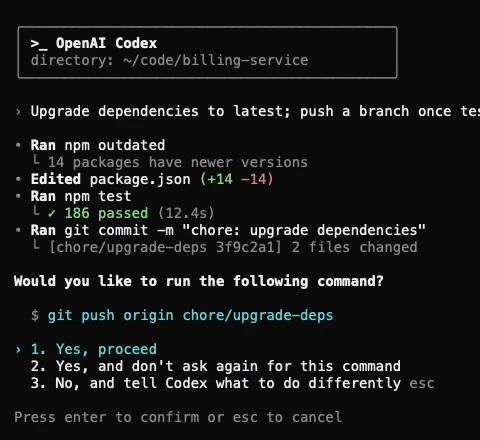
See who is waiting for you
The sidebar groups conversations by project and task and marks who is running, waiting for approval or waiting for your reply. The ones that need you collect at the top under “waiting for you”.
- ⌘J jumps to a waiting conversation, approvals first
- States come from each agent's hook events, not from reading the screen
- Right-click to mark unread or pin; ⌘K searches conversations

02
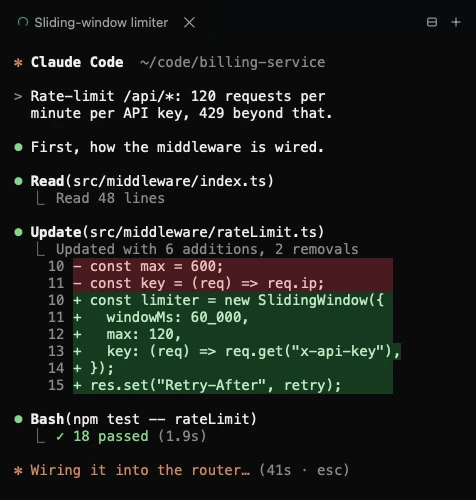
Real terminals, not a chat imitation
Each agent runs in its own terminal, with its own interface, shortcuts and prompts. Put several agents in one task and drag tabs to split them side by side or stacked.
- Click file paths in a terminal to open them in Shifu, the default app or Finder
- Terminal text 10–24 pt, with ⌘= ⌘- ⌘0
03
Close the window. Agents keep running.
A dedicated tmux server owns the sessions; the desktop window only displays and controls them. Quitting, reopening or even a crash does not end an agent. Tasks and split layouts come back, and after a reboot the conversation you open resumes its own session.
More
-
Tasks and progress
One task holds several agents; the progress page gives each task its goal, focus and checklist. Docs →
-
Notifications
A macOS notification when an agent waits; opening one conversation clears only its own. Docs →
-
Quotas and usage
Claude, Codex, Kimi and CodeBuddy quotas and reset countdowns, read from local records. Docs →
-
Another Mac or a phone
End-to-end encrypted through your own HTTPS relay; a phone connects over your private network. Docs →
-
Computer and browser use
shifu computerdrives local windows andshifu browserdrives web pages; both optional. Docs (Chinese) → -
Keep long runs going
The cup in the menu bar keeps the Mac awake, on a timer or with the lid closed. Docs (Chinese) →
How it works
Three steps
-
01
Install
Download and verify the preview, put the app in
~/Applicationsand the matchingshifuin~/.cargo/bin. Install tmux and your agents. -
02
Pick a project and an agent
Shifu finds the agent CLIs on your terminal's PATH (nvm, volta and bun installs included) and links install pages for the rest.
-
03
Work
Add agents to a task (⌘T) side by side; whoever stops shows up under “waiting for you”, and ⌘J takes you there.

Open source and privacy
Local first, source in the open
Shifu is MIT-licensed. Download packages are built by GitHub Actions from the public source, with the build source recorded in BUILD-INFO.json inside the package.
No account, no telemetry
No hosted account and no telemetry. State, tasks and layouts stay on your Mac in ~/.shifu/app.
Your global settings stay as they are
Hooks for Claude Code, Codex and CodeBuddy are passed to the processes Shifu starts; it does not change ~/.claude/settings.json or ~/.codex/config.toml.
Exceptions are backed up first
Kimi only reads its own config, so Shifu writes hooks into ~/.kimi-code/config.toml; Antigravity gets a group in ~/.gemini/config/hooks.json. Your own entries stay, and both files are backed up before the first write.
Remote runs on your own route
The phone gateway listens on 127.0.0.1; Mac-to-Mac uses your own HTTPS relay with end-to-end encrypted terminal data. Use a relay whose web client you trust.
Install
Get the Apple Silicon preview
The preview contains the app, the matching shifu CLI and setup instructions. It is an early version; read “Before you install” first.
Paste this into Claude Code or Codex:
Install Shifu (https://github.com/Nalu-Lab/shifu) for me. Read README.en.md and docs/INSTALL.en.md first.
1. Confirm this is an Apple Silicon Mac. Check that tmux and my chosen agent are installed and signed in; tell me what is missing.
2. Download the ZIP and SHA256SUMS from the same release linked in the README. Verify the download and extracted-file checksums. Use the packaged app and CLI by default; do not install Rust or build from source.
3. Follow the package instructions: put Shifu.app in ~/Applications and its matching bin/shifu in ~/.cargo/bin/shifu. Add ~/.cargo/bin to the current shell PATH, verify shifu --help, and explain the full-path option for new terminals. For an existing installation, explain the brief quit needed for the upgrade and preserve the old app, CLI and sessions. Do not overwrite a running app.
4. Explain that the app is signed with Shifu's own certificate, not notarized by Apple, and starts agents in no-confirmation mode. Leave system security prompts to me. Configure StepFun, computer use, a remote relay or background follow-up only if I request them.
5. Help me choose a project and start my first agent conversation. On the first Codex launch, let me review its hooks before deciding whether to trust them.
-
Download the ZIP and
SHA256SUMSfrom the 0.4.3 preview release. Runshasum -a 256 -c SHA256SUMSin the download folder, then unzip. - For an existing install, quit it and back up the old app and CLI first. In the extracted folder, run:
shasum -a 256 -c SHA256SUMS
mkdir -p "$HOME/Applications" "$HOME/.cargo/bin"
install -m 755 bin/shifu "$HOME/.cargo/bin/shifu"
rm -rf "$HOME/.cargo/bin/web" && ditto bin/web "$HOME/.cargo/bin/web"
export PATH="$HOME/.cargo/bin:$PATH"
brew install tmux   # skip if already installed
-
After verification, move
Shifu.appto~/Applications, open it, and pick a project and a signed-in agent.
export PATH only affects the current terminal; in a new one use "$HOME/.cargo/bin/shifu" or add the folder to your shell config. Full details in the install guide.
FAQ
Questions
Does Shifu cost anything?
Does it replace Claude Code or Codex?
What happens when I close or quit Shifu?
Intel Mac, Linux or Windows?
What does remote access need?
Can I use only the CLI?
shifu opens the workbench, shifu new claude ~/proj starts an agent, shifu ls lists sessions and shifu jump opens a waiting one. The CLI uses its own socket and folder (~/.shifu).